Import your work from X
Vidit reads the geolocations you already publish on X and creates a detection for each one. There are three ways in and one engine behind them, so a post reads the same whichever you use. There is no format to learn: write your post as you always do.
What makes a detection
Two conditions, the same for every entry. The post is yours: it comes from the X handle linked to your Vidit account, and a retweet does not count. It carries a coordinate: anywhere in its text, or in the text of your own post it directly replies to. A coordinate that appears only in a post you quote does not count. One exception reads further: a reply that says nothing but @ViditBot points at the thread above it, so the bot climbs your own posts, up to three, until it finds the one carrying the coordinate.
What the detection carries
analyst
@analyst
@frontlinefootage
2Drone strike on a vehicle depot
- 1
Coordinates, in any usual format.
- 2
Source: the post you quote, or a single link.
- 3
Source media: the footage in the quoted post.
- 4
Title: the first line with more than coordinates and links.
- 5
Proof: your text as written, and your photos as proof images.
If a detection looks wrong
- Coordinates: decimal pairs (48.012345, 37.802411), a hemisphere letter (33.1°N 35.5°E, N48.0123 E37.8024), DMS (48°00'45"N 37°48'08"E) or a Google Maps @lat,lng link. Text inside an image is not read.
- Source: a quote outranks links. A link to your own post, an X link naming no post and a Google Maps link never count. Several candidate links leave the source empty, and you pick one at review.
- Media: with no quote, the source post's media fills the slot, then your thread's first own video.
- Title: cut at 120 characters. With no qualifying line, you type one at review.
- Proof: shortened links are expanded back, and you edit the text at review.
A detection then follows the path from detection to geolocation. A post carrying several coordinates makes one detection each, sharing every other field. Importing the same geolocation again reuses the first detection, and one you already published or rejected stays as it is, so re-running an import is always safe.
Three ways in
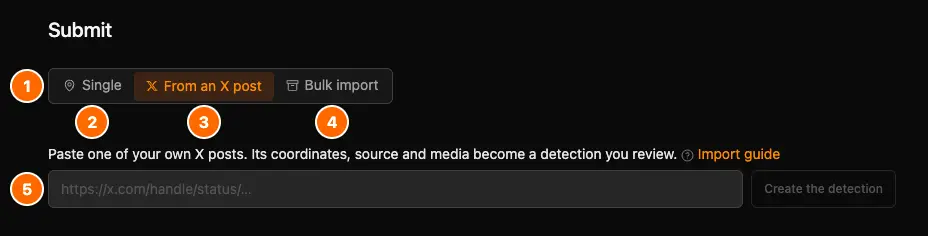
- 1
The mode selector: pick how you bring work in.
- 2
Single: a geolocation or a request you fill in yourself.
- 3
From an X post: read one of your own posts.
- 4
Bulk import: upload your X archive.
- 5
Paste the link to your post here.
Tagging @ViditBot needs no form: you tag it on X.
Upload your X archive
Upload your official X export and every geolocation you already published comes back as a detection. This is the only entry that reads your whole history at once, and the only entry that stitches full self threads, so a coordinate you posted three replies down still lands beside the source you posted at the top.
- 1
Request your archive on X
On X: Settings → "Your account" → "Download an archive of your data". - 2
Wait for X to build it
Confirm your password. X prepares the file and notifies you when it's ready (often minutes, up to 24h). - 3
Download the .zip
Open the link from X's email or in-app banner and save the zip to your device. - 4
Upload it on Vidit
Open Submit and drop the zip on the archive panel. Your browser strips the zip before uploading it, which reduces the upload size.
The stripped zip must stay under 4 GB. Contact us if yours is larger after stripping. X's own guide
An export runs as a background job, so you can close the page. Vidit emails you the outcome when it finishes: how many detections were created, updated and skipped, and how many need a source or carry several coordinates. To resume an import that failed, upload the same export again.
Paste a post URL on Vidit
Open Submit, pick From an X post and paste the link to one of your own posts. The detection is created while you wait; the review opens on it when nothing needs your attention, otherwise the page tells you what does. For a third party's footage, use the plain submit form with a source URL.
Warnings and refusals are shown on the page rather than on X, and nothing is posted under your handle, so this is the way in when you do not want a public trace.
Tag @ViditBot on X
Tag @ViditBot on a geolocation post and the detection appears on Vidit within seconds. You do not leave your feed and you retype nothing. The bot stays silent for a handle not linked to a Vidit account. It reads public posts only, so a tag from a protected account imports nothing. Replying to a post that tagged the bot does not tag it again: X carries the mentions over into your reply, and the bot reads only the tag you type after your own words.
Your post, then your own reply
Post the geolocation, then reply to yourself with the source and the tag. The bot reads both posts as one, and the detection is filed under the first of them, so tagging either one imports the same geolocation once. This is also how you import a post you published earlier. The coordinate, the source link and the tag can also sit on one post.
analyst
@analyst
analyst
@analyst · replying to @analyst
No coordinate yet? It opens a request
Mirror someone else's footage with no coordinate of your own and the bot opens a request instead of refusing: the post you linked becomes the source, its own clip becomes the evidence, and the request goes on the board for anyone to geolocate. It is yours: it sits with your other open requests on your profile, where you edit it or withdraw it. When the link is an X post or a public Telegram post, the bot reads the clip and the date from it and the copy you attached is the fallback. Any other link, a YouTube video or a news page, works too, as long as you attach the clip yourself. Tag the same post again and nothing is duplicated.
analyst
@analyst
Vidit
@viditbot · replying to @analyst
The bot answers in-thread with your detection's reference and with what to fix at review: an empty source, several coordinates, a missing footage file or post date, or media already on Vidit. When nothing imports, it names why, a mirror with no clip attached included. Replies are capped per hour, so a burst of tags still creates every detection while some of them go unanswered.
Vidit
@viditbot · replying to @analyst